



Why I Use Showit for Every Client Website (And What You Should Know Before Choosing a Platform)
You’ve spent forty-five minutes trying to move a text block three inches to the left. You’ve refreshed the preview seventeen times. You’re starting to wonder if your website will ever feel like it actually belongs to your brand — or if this is just… what websites feel like.
If that sounds familiar, this post is for you.
As a brand and web designer, I’ve worked with a variety of platforms over the years. And while every platform has its place, I find myself returning to Showit again and again — for my clients and for my own work. It offers something that’s genuinely hard to find: creative freedom, ease of use, and a support team that actually cares.
If you’re a photographer, artist, or creative business owner trying to figure out where to build your website, here’s my honest take — including a brief comparison with Squarespace for those of you weighing your options.
What Is Showit?
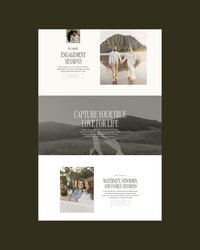
Showit is a fully customizable website platform built with creative business owners in mind. It lets you design your site visually — dragging and placing elements exactly where you want them — without writing a single line of code.
Unlike more rigid platforms, Showit gives you full control over both your desktop and mobile design independently, which is something I genuinely value when I’m creating thoughtful, artful websites for my clients. There’s no grid to fight, no section constraints, no “you can’t do that here.” The canvas is blank, and you fill it however your brand calls for.
The simplest way I know to put it: most platforms help you build a website. Showit helps you design one.
If you’re curious, you can explore Showit here → Get your first month of Showit free!
Why I Choose Showit for My Client Websites
When I’m designing a website for a client, I’m thinking about more than just how it looks. I’m thinking about how it functions, how easy it will be to maintain, and how well it supports their business long-term. Showit consistently delivers on all of it — and here’s why.
1. Complete Creative Freedom, Without Code
Showit allows for total design flexibility. I can build something that feels truly custom and aligned with a client’s brand, without being hemmed in by templates or technical constraints.
Showit’s advanced plan also integrates directly with WordPress for blogging — which means your blog is powered by the most widely used publishing platform in the world, complete with access to plugins and strong SEO capabilities. It’s a combination that’s hard to beat for creative businesses who want a beautiful site and a seriously functional blog.
For creative businesses especially, this makes an enormous difference. Your website should feel like an extension of your work — not a boxed-in version of it. You can layer text over images, design asymmetrical layouts, use oversized typography, play with spacing and proportion — all by dragging, dropping, and adjusting. If you can picture it, you can build it.
2. Clients Can Update It Themselves
One of my biggest priorities when designing a website is making sure my clients feel genuinely confident using it after launch. There’s nothing worse than handing someone a beautiful site they’re afraid to touch.
Showit is intuitive enough that you can swap images, update text, and make small changes without needing a developer on call. That kind of independence matters — especially for small business owners who need to move quickly and can’t always wait on outside help.
3. Desktop and Mobile Are Designed Independently
This is one of Showit’s most powerful features, and one that often gets overlooked until you’ve experienced the alternative.
On most platforms, your mobile site is essentially a compressed version of your desktop layout — and the results are often awkward. On Showit, you design both canvases intentionally and separately. Your mobile experience isn’t an afterthought; it’s a considered design decision. For brands where visual presentation is central to the work, this is a genuine game-changer.
4. Hosting Is Included and It Just Works
Hosting is bundled with Showit, which simplifies things significantly. There’s no juggling multiple platforms, no technical setup to manage, no wondering if everything is talking to each other correctly. Everything lives in one place and runs reliably behind the scenes.
5. The Support Team Is Genuinely Wonderful
This one might sound small, but it matters more than you’d think.
Showit’s support team is responsive, kind, and actually helpful — whether you have a quick question or something more complex. For clients who aren’t super tech-oriented, knowing that help is available and that it won’t feel like pulling teeth is a real source of peace of mind.
A Quick Note on Showit vs. Squarespace
I get this question often, so I want to address it honestly.
Squarespace is a well-built platform, and it works well for plenty of businesses. I personally started on this platform and eventually moved to Showit when I was scaling my wedding photography business. If you need something functional and live quickly, don’t have a strong design vision yet, or your business relies heavily on built-in e-commerce tools, Squarespace is a solid choice. It removes friction, and getting online is always better than waiting for perfect.
But in my experience — especially for creative businesses with a strong visual identity — Showit offers a different level of design flexibility. You’ll notice when two businesses are on the same Squarespace template. On Showit, that ceiling doesn’t exist. The end result can look and feel entirely, unmistakably yours.
If your goal is a website that’s truly tailored to your brand rather than adapted from a framework, Showit tends to be the better fit.
Is Showit Right for You?
Showit is worth exploring if you:
- Are a photographer, artist, surface pattern designer or creative business owner
- Have a strong visual brand and want your website to actually reflect it
- Value design flexibility and want to move beyond what templates allow
- Want a platform that’s beautiful and manageable after launch
- Are building something intentional and long-term, not just getting something live
One honest note: Showit does have a learning curve, especially coming from a more constrained editor. But with a strong template as your starting point, that curve is much gentler — and once it clicks, the creative freedom is genuinely satisfying. This is exactly why I record video tutorials for all of my website clients so they can confidently make edits and updates independently after we launch.
A Note From My Experience
Every website I design is built with both beauty and function in mind. I want my clients to walk away with something that not only looks exactly right, but feels intuitive to use and actively supports their business.
Showit is the platform that lets me do that consistently — for brands at every stage, in every aesthetic direction. It’s not the right fit for every single business, but for the creative, design-forward clients I work with, it comes closer than anything else I’ve tried.
That’s why I keep coming back to it. And why I keep recommending it.
Ready to Explore Showit?
If this is sounding like your kind of platform, your first month is on them (and me!).
Start your Showit site here → Get your first month of Showit free!
That link is an affiliate link, which means I earn a small commission if you sign up, at no extra cost to you. I only share tools I genuinely use and stand behind.
Whether you build it yourself or bring in a designer, your website is one of the most meaningful investments you make in your business — and it’s worth doing in a way that feels both beautiful and aligned with where you’re headed.
Want Someone to Handle the Design for You?
If reading this made you think “I want a beautiful Showit site, but I really don’t want to build it myself” — that’s exactly what I’m here for.
I work with creative small business owners to design Showit websites that look and feel like their brand. No more fighting your platform. No more settling for almost-right.
Book a free design discovery call and let’s talk about what your website could look like.
Once you’ve decided on Showit, these two posts will help you hit the ground running: How to Build a Brand Kit in Canva and My Favorite Showit Website Templates.
You Might Also Like
Free Canva Brand Style Guide Template

My Favorite ShowIt Website Templates

Life and Business Affirmations for Creatives

An inspiring note to revisit daily and encourage your creativity.
A curated selection of my favorite templates from Davey & Krista.
A template to help you confidently organize brand visuals in Canva.
Get the link
READ THE POST
Download now

Not sure what your brand colors or fonts actually are? This free template walks you through actionable visual decisions for your brand so you have a clear, consistent foundation to build from.
Canva Brand Style Guide
a free template for you...
Build Your Brand Style Guide • Build Your Brand Style Guide • Build Your Brand Style Guide
